

You walk through your front door after a long day, and the last thing you want to do is sweep and mop the kitchen floor. Yet crumbs and sticky spots greet you every morning. You know a robot vacuum can help, but the price tags on the flashy models make your wallet wince. You need something that scrubs and vacuums without breaking the bank. The good news? The market for affordable robot vacuum mop combos has exploded. Today, you can get serious cleaning power for under $300, often under $200. This guide cuts through the noise, the gimmicks, and the confusing spec sheets to help you choose a combo that actually works for your home and your budget.
What Exactly Is an Affordable Robot Vacuum Mop Combo?
An affordable robot vacuum mop combo is a single robotic device that both dry-vacuums debris and wet-mops hard flooring. Unlike older models that just dragged a wet pad around, modern budget units use smart navigation, water tanks, and targeted scrubbing. The “affordable” bracket typically spans $150 to $350, offering genuine two-in-one functionality without the $800+ price tag of premium flagships.
The Core Components of a Budget Combo
Every combo includes a dustbin for dry debris, a water tank (often detachable), and a microfiber mopping pad. The vacuum motor pulls in dust and crumbs while the mop pad drags or scrubs behind it. In cheaper models, the pad is static; in slightly higher-end budget units, the pad vibrates or oscillates to scrub stuck-on messes.
How Is “Affordable” Defined in Today’s Market?
We define affordable as under $350 retail. At this price, you sacrifice features like self-emptying bases and advanced LiDAR navigation, but you still get solid suction (2000–3000 Pa), app control, and decent battery life (90–120 minutes). Brands like Roborock, Eufy, and iRobot have sub-$300 models that compete well with older $600 units.
What You Should NOT Expect at This Price Point
You won’t get automatic mop pad washing, hot-water mopping, or advanced obstacle avoidance. The mopping is best for maintenance cleaning, not deep scrubbing of dried mud. Understanding these trade-offs helps you avoid disappointment and pick a unit that matches your real needs.
Why Choose a 2-in-1 Robot Instead of a Separate Vacuum and Mop?
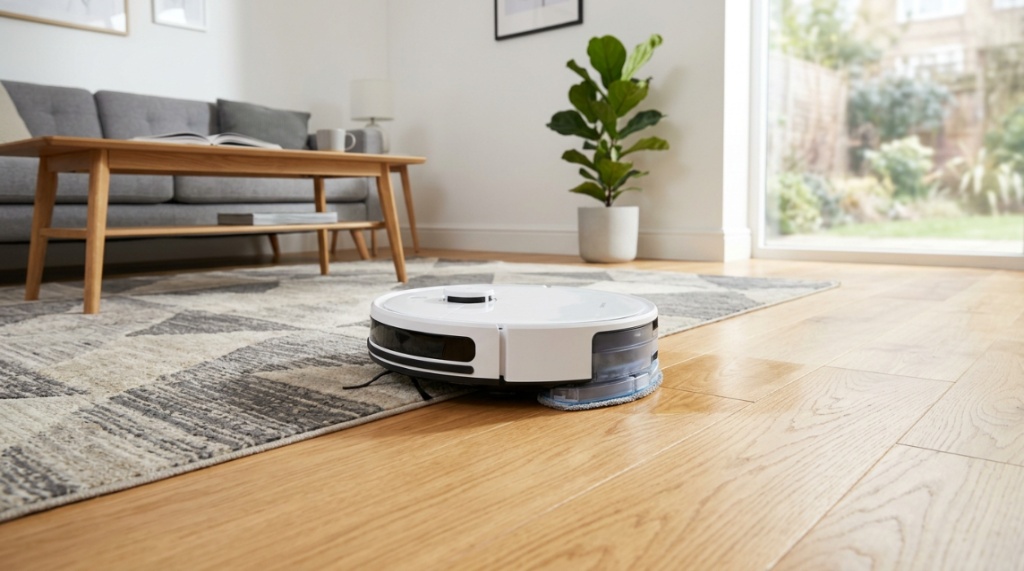
Choosing a 2-in-1 saves floor space, reduces purchase cost, and cuts your daily cleaning time in half. Instead of running a robot vacuum first, then manually mopping, the combo does both in a single pass. For busy homeowners with mostly hard floors, this is the most efficient solution to everyday mess management.
Time Savings That Actually Matter
Most combos let you schedule cleaning while you’re at work. By the time you arrive home, your floors are vacuumed and lightly mopped. You reclaim 20–30 minutes daily that you would have spent on a separate mop routine. Over a year, that’s over 100 hours saved.
Space and Clutter Reduction
You store one device instead of two. No separate mop bucket, no spare vacuum cluttering a closet. The robot docks in a corner and stays out of sight. For apartments or small homes, this is a massive advantage over dedicated machines.
Lower Total Cost of Ownership
Buying a robot vacuum and a separate robot mop would cost $400–$700 total. A good 2-in-1 combo in the affordable range costs $200–$300. You also buy fewer replacement parts and filters. The math is simple: the combo pays for itself in convenience and upfront savings.
Which Floor Types Work Best with Affordable Combos?
Affordable robot vacuum mop combos perform best on hard, non-carpeted surfaces: tile, hardwood, laminate, vinyl, and stone. On these floors, the vacuum picks up debris while the mop catches dust and light grime. Most budget units struggle on thick carpets, but they can handle low-pile rugs if you set the vacuum-only mode.
Hardwood and Laminate Considerations
Budget combos typically use a wet pad that drags across the floor. This is safe for sealed hardwood and laminate, but you must ensure the pad is damp, not soaking wet. Over-wetting can seep into seams and cause swelling. Look for models with adjustable water flow to protect your floors.
Tile and Vinyl Performance
Tile and luxury vinyl plank (LVP) are ideal. The mop removes grout haze, dust, and everyday footprints. Bonus: many budget combos detect carpet and automatically lift or bypass the mop pad, so they won’t soak your area rugs. Always check the specs for this feature before buying.
Carpet Handling: What to Expect
Affordable combos cannot deep-clean carpets. They work as vacuum-only on low-pile rugs and doormats. The mopping function must be disabled or the pad raised/removed for carpeted areas. If more than 40% of your home is medium-to-high pile carpet, consider a dedicated vacuum-only robot instead of a combo.
How to Compare Suction Power and Mopping Quality on a Budget
For affordable combos, look for suction between 2000 and 3000 Pa. That range is enough to pick up rice, pet hair, and cereal from hard floors. Mopping quality depends on pad material and water flow control. A vibrating or oscillating mop pad at 200–300 strokes per minute outperforms a static dragging pad for stuck-on messes.
The Suction Sweet Spot for Hard Floors
On tile or hardwood, you do not need 5000 Pa of suction. That level is overkill for hard floors and often wastes battery. At 2200–2500 Pa, budget models like the Eufy G30 or Roborock Q5 reliably pick up debris without scattering it. Check user reviews for real-world pickup tests, especially for pet hair and fine dust.
Mopping Pad Technology Explained
Two types dominate the budget market: static drag pads and vibrating pads. Static pads simply glide over the floor and remove surface dust. Vibrating pads (like the Yeedi Vac 2 Pro or Roborock Q5 Pro) scrub at high frequency, lifting dried juice and grime. If you have kids or pets, spring for the vibrating type.
Water Flow Control: A Forgotten Feature
Manual water flow adjustment lets you set low for daily maintenance, medium for light spills, and high for sticky spots. Without this control, the pad might over-saturate your floor or dry out too quickly. Most quality affordable combos now offer 3 to 4 flow levels in the app. Never skip this spec.
Which Navigation System Is Best for Cheap Robot Combos?
For affordable combos, gyroscopic navigation or vSLAM (visual simultaneous localization and mapping) offers the best balance of cost and cleaning coverage. Stay away from random-bounce bots if you want thorough mopping. A mapped and systematic navigation plan ensures the mop covers every inch without missing or rewashing areas.
Random Bounce vs. Systematic Navigation
Random bots bump around until the battery dies. They often miss entire rooms and over-clean corners. Systematic navigation uses gyroscopes or a camera to create a floor plan, resulting in neat, zipper-like passes. For mopping, systematic navigation is non-negotiable; a random path leaves wet streaks in unpredictable patterns.
LiDAR vs. Camera-Based Systems on a Budget
LiDAR (laser) navigation is rare under $300 but exists in models like the Roborock Q5. It maps faster and works in the dark. Camera-based (vSLAM) systems, common in Eufy models, use visual cues and work well in lit homes. Both are excellent; choose LiDAR if you plan to run the robot at night with lights off,When building out your smart home on a budget, coordinating your appliances is key. Just as you want your affordable robot vacuum mop combos to run seamlessly on a schedule, you also want your home security systems to run without disruption. Understanding how your smart devices interact can prevent unexpected glitches, much like learning how to troubleshoot Fire Alarm False Alarms and Their Common Causes keeps your household running safely and quietly.
The Impact of Mapping on Mopping Efficiency
Once the robot maps your home, you can set no-mop zones, define room-specific cleaning schedules, and order the robot to clean high-traffic areas first. Mapping also prevents the mop from running over carpet. Without mapping, you will either have to manually block off carpets or watch the robot soak your rug.
What Battery Life Should You Look For in an Affordable Combo?
Look for at least 100 minutes of runtime on a full charge. Affordable robot vacuum mop combos average 90–150 minutes. That covers up to 1,200 square feet of hard flooring in a single run. If your home is larger, consider a model with a recharge-and-resume feature so the bot finishes the job after recharging.
Real-World Battery Testing Tips
Manufacturer runtime claims are tested with vacuum on a low setting and mop pad damp, not wet. In real use, expect 20–30% less runtime. If you run the vacuum on “max” suction and “high” water flow, battery life may drop to 60–70 minutes. Always read user reviews for honest battery feedback.
Recharge and Resume: A Must-Have for Large Homes
When the battery runs low, the robot returns to the dock, recharges, and then resumes cleaning from where it stopped. Without this feature, you must manually restart the bot and it often re-cleans areas it already finished. For homes over 1,000 square feet, do not buy a combo without this feature.
What Happens During Combined Vacuum and Mop Mode?
When vacuuming and mopping simultaneously, both motors draw power. The water pump also consumes energy. This combined load shortens runtime compared to vacuum-only mode. Budget for a 15–20% runtime reduction when using both functions. Plan your cleaning schedule accordingly so the robot finishes before its battery dies.
How Important Is App Control and Smart Home Integration?
App control is essential for scheduling, adjusting suction and water flow, and setting virtual boundaries. Without an app, you are stuck with the robot’s default behavior, which rarely matches your home’s needs. Affordable combos from Eufy, Roborock, and Dreame offer robust apps that even allow voice control via Alexa or Google Assistant.
Must-Have App Features for Budget Robots
At minimum, the app should offer: scheduling (daily or weekly), suction level adjustment (3–4 levels), water flow control, spot cleaning mode, and a zone-cleaning feature. Bonus features include no-mop zones, room naming, and cleaning history. All of these are available in affordable combos from known brands.
Do You Really Need Voice Control?
Voice control via Alexa or Google Assistant is convenient but not critical. Saying “Alexa, ask [robot name] to clean the kitchen” is faster than opening the app. However, most affordable combos support this natively. If you already use smart speakers, prioritize a model with compatible integration.
The Pitfalls of Cheap Apps
Some no-name brands have buggy, unresponsive apps that crash or fail to save settings. Stick with established brands that update their apps regularly. A good rule: if the brand also sells premium robots, their budget model’s app is usually polished and reliable. Avoid generic white-label brands that vanish after six months.
Which Brands Offer the Best Affordable Robot Vacuum Mop Combos in 2025?
Roborock, Eufy (Anker), Yeedi, Dreame, and iRobot (Roomba) dominate the affordable combo space. Each offers distinct strengths at different price points. For example, Roborock excels in navigation, Yeedi focuses on mopping quality, and Eufy provides reliable simplicity. Checking detailed reviews for each model is important to find the right fit for your home.
Roborock Q5 Pro: The Navigation Champion
The Roborock Q5 Pro combines LiDAR navigation with 2700 Pa suction and a vibrating mop pad, typically priced under $350. It maps your home in minutes and offers excellent no-mop zone features. The mopping pad scrubs effectively on tile and hardwood. It is widely considered the best value pick of 2025.
Eufy G30 Verge: The Simple Performer
Eufy’s G30 Verge uses vSLAM navigation and offers 2000 Pa suction with a static mop pad. It is quieter than most and the app is rock solid. The mopping is suitable for daily dust and light grime, making it a great choice for renters or people who do not have heavy messes. It often sells for under $200.
Yeedi Vac 2 Pro: The Mopping Specialist
Yeedi focuses heavily on mopping performance. The Vac 2 Pro features 2500 Pa suction and an oscillating mop pad that scrubs at 250 times per minute. It handles dried-on ketchup and coffee spills better than any other robot in its class. The mapping system is camera-based and works reliably in well-lit homes.
What Maintenance Does an Affordable Combo Require?
Maintenance is straightforward but non-negotiable. You must empty the dustbin after every run, wash the mop pad every 2–3 uses, and clean the brushes weekly. The water tank needs purging every month to prevent mold. Following this routine keeps your affordable robot vacuum mop combos performing like new for years.
Daily and Weekly Cleaning Steps
After each cleaning, empty the dustbin and rinse the mop pad by hand or toss it in the laundry (if washable). Weekly, remove the main brush and side brushes to untangle hair. Check the cliff sensors and charging contacts for dust buildup. This routine takes less than 10 minutes total.
Replacement Parts and Costs
Budget for new mop pads ($10–$20 for a 4-pack) every 3–4 months. Brushes need replacement every 6–8 months ($15–$25). Filters should be swapped every 3 months ($10–$15). Over a year, expect to spend $60–$100 on consumables. This is normal and keeps your robot running efficiently.
How to Extend the Life of Your Robot Combo
Store the robot in a dry area away from direct sunlight. Do not leave water in the tank for more than 48 hours. Use a dehumidifier in the room if you live in a humid climate. When not mopping, remove the water tank to reduce weight on the robot’s wheels and motors.
Can Affordable Robot Combos Handle Pet Hair and Allergies?
Yes, but only on hard floors. Most affordable combos with 2000+ Pa suction and a rubber brush roll handle pet hair well on tile, vinyl, and hardwood. The mop pad then picks up the fine dust and dander that the vacuum might miss. For allergy sufferers, look for models with a HEPA filter or high-efficiency filter.
Pet Hair on Hard Floors vs. Low-Pile Rugs
On hard floors, the combo picks up pet hair easily during the vacuum pass. On low-pile rugs, the vacuum works well, but pet hair may still get tangled in the brush roll. Check if the brush roll is “tangle-free” or has a comb to cut hair. Models with rubber roller brushes require less maintenance than bristle brushes.
Allergen Trapping and Air Quality
A HEPA filter traps 99.97% of particles as small as 0.3 microns, including pollen, dust mites, and pet dander. Many affordable combos label their filters as “high-efficiency” but not true HEPA. For severe allergies, confirm the HEPA rating in the specs. If not listed, buy a separate pack of HEPA replacement filters.
Limitations with Long-Haired Pets
Long hair from Golden Retrievers or cats can wrap around the side brushes and main brush. You will need to cut the hair off manually every few days. Some models, like the Roborock Q5 series, have better anti-tangle designs, but no budget combo is completely immune to long hair wrapping.
How Much Should You Spend on an Affordable Robot Vacuum Mop Combo?
The sweet spot for value is $200–$300. In this range, you get systematic navigation, adjustable water flow, decent suction, and reliable app control. Spending less than $150 often means random navigation, weak suction, and poor mopping. Spending more than $350 enters the mid-range where you gain self-emptying bases but not dramatically better mopping.
Under $150: What You Gain and Lose
Sub-$150 combos exist, but they use outdated random navigation and static mop pads. They often lack water flow control and have shorter battery life. They can be fine for a single small room (like a kitchen or bathroom) but will frustrate you in a multi-room apartment.
The $200–$300 Goldilocks Zone
This bracket offers models with cameras or gyroscopes for mapping, 2000–3000 Pa suction, vibrating mop pads, and excellent app features. The Roborock Q5 Pro and Dreame D10 Plus are prime examples. You get 85–90% of the cleaning quality of a $600 robot for roughly half the price.
$300–$350: Premium Features at a Near-Budget Price
At this ceiling, you sometimes find LiDAR navigation or a self-emptying base on sale. These models represent the best value for larger homes or for users who want truly hands-off mopping. If you can stretch your budget to $350, you will notice a significant jump in convenience and cleaning consistency.
Frequently Asked Questions
Do affordable robot vacuum mop combos work on thick carpets?
No. Affordable combos are designed primarily for hard floors. They can vacuum low-pile rugs but will not effectively mop thick carpets. For medium-to-high pile carpet, use the vacuum-only mode and remove the mop pad.
Will the mop pad damage my hardwood floors?
Not if you keep the pad damp and use the correct water flow setting. Over-wetting can damage unsealed hardwood. Test the combo in an inconspicuous area first and always use the lowest water flow setting for hardwood floors.
How often do I need to replace the mop pads?
Mop pads typically last 3–4 months with regular washing. When the pad becomes frayed, smelly, or fails to absorb water effectively, replace it. Most brands sell multipacks for under $20.
Can I use the robot for vacuuming only without the water tank?
Yes. Most combos let you remove the water tank and mop pad entirely, converting the robot into a standard vacuum-only unit. This is useful for carpeted rooms or when you only need dry debris picked up.
Do these robots create streak marks on tile floors?
Streak marks occur when the mop pad is dirty or when using too much water. Wash the pad after every 2–3 uses and use a damp (not wet) pad. Hard water can also cause streaks; using distilled water in the tank helps.
How long do the batteries of affordable combos last?
Most units last 90–150 minutes on a charge in standard mode. Battery life degrades over time, typically by 10–15% per year. Replacing the battery is usually more expensive than buying a new robot, so plan for 2–3 years of service.
Is it worth buying a refurbished or used model to save money?
Refurbished models from the brand or an authorized seller can be a good deal, often 30–40% off retail. However, used models from individual sellers often come with worn batteries, dirty sensors, and no warranty. Stick with certified refurbished for peace of mind.